人脸识别SDK开发说明
功能说明
sdk型号:Antelope 100
支持特性:
人脸检测/定位
特征提取
特征对别
活体检测
年龄/性别检测
最小图片支持:40x40像素
授权说明:
授权方式:按设备台数终身授权,提交授权申请时需要提供设备SN和IMEI信息。
开发测试请联系技术支持开通。(测试授权有效期:自开通之日一个月内有效)
正常采购请联系商务下单采购。
资源下载:
请点击下载SDK开发包
请点击下载iFace演示APP
1、 开发说明
1.1、业务流程:

1.2、开发流程:
- SDK激活
- 初始化SDK(识别、活体、属性)
- 人脸检测
- 图像质量判断
- 活体检测
- 特征提取
- 人脸特征比对
- 识别成功
- 资源释放
2、SDK 接口说明
2.1、获取SDK实例
FacePredictor mFacePredictor= FacePredictor.getInstance\(\);
public static FacePredictor getInstance();
| 参数 | 类型 | 说明 | |
|---|---|---|---|
| 输入参数 | 无 | ||
| 输出参数 | FacePredictor | FacePredictor | FacePredictor实例 |
2.2、SDK授权激活
mFacePredictor.activePredictore\(context\);
public int activePredictore(Context context, String id, String secret)
| 参数 | 类型 | 说明 | |
|---|---|---|---|
| 输入参数 | context | Context | app运行Context |
| 输出参数 | result | int | 0:授权激活成功 -1:授权失败 -2:模型加载失败 |
备注. 首次执行授权激活时需要连接网络,请在执行前确保网络联通,否则会授权失败。 ↩
2.3、获取激活状态
mFacePredictor.activePredictore\(context\);
public int getActiveState(Context appCtx)
| 参数 | 类型 | 说明 | |
|---|---|---|---|
| 输入参数 | appCtx | Context | app运行Context |
| 输出参数 | result | int | 0 成功 -1 授权失败 -2模型加载失败 |
2.4、初始化识别模型
mFacePredictor.initFaceRecPredictor\(\);
public int initFaceRecPredictor()
| 参数 | 类型 | 说明 | |
|---|---|---|---|
| 输入参数 | 无 | ||
| 输出参数 | result | int | 0 成功 |
2.5、初始化属性检测模型
mFacePredictor.initFaceAttrPredictor\(\);//初始化属性检测模型
public int initFaceLivenessPredictor()
| 参数 | 类型 | 说明 | |
|---|---|---|---|
| 输入参数 | 无 | ||
| 输出参数 | result | int | 0:成功 |
2.6、初始化活体检测模型
mFacePredictor.initFaceLivenessPredictor\(\);//初始化活体检测模型
public int initFaceAttrPredictor()
| 参数 | 类型 | 说明 | |
|---|---|---|---|
| 输入参数 | 无 | ||
| 输出参数 | result | int | 0 成功 |
2.7、释放识别模型
mFacePredictor.uninitFaceRecPredictor\(\);
public void uninitFaceRecPredictor()
| 参数 | 类型 | 说明 | |
|---|---|---|---|
| 输入参数 | 无 | ||
| 输出参数 | 无 |
2.8、释放属性检测模型
mFacePredictor.uninitFaceAttrPredictor\(\);
public void initFaceAttrPredictor()
| 参数 | 类型 | 说明 | |
|---|---|---|---|
| 输入参数 | 无 | ||
| 输出参数 | 无 |
2.9、释放活体检测模型
mFacePredictor.uninitFaceLivenessPredictor\(\);
public void uninitFaceLivenessPredictor()
| 参数 | 类型 | 说明 | |
|---|---|---|---|
| 输入参数 | 无 | ||
| 输出参数 | 无 |
2.10、人脸检测质量阈值设置
public int setFaceQualityThreshold(double threshold)
| 参数 | 类型 | 说明 | |
|---|---|---|---|
| 输入参数 | threshold | double | 设置阈值在0~1内,值越大质量要求越高 |
| 输出参数 | rtn | int | 0:成功 -1:失败 |
备注. 默认值:0.8 ↩
2.11、人脸检测质量阈值查看
public double getFaceQualityThreshold()
| 参数 | 类型 | 说明 | |
|---|---|---|---|
| 输入参数 | 无 | ||
| 输出参数 | rtn | double | 返回当前人脸质量阈值(0~1内double类型) |
2.12、人脸检测-Bitmap
public List<Rect> faceDetectBitmap(Bitmap bitmap, int rotate)
| 参数 | 类型 | 说明 | |
|---|---|---|---|
| 输入参数 | bitmap | Bitmap | 静态图片 |
| rotate | int | 图片需要旋转的角度 90、180、270、360 |
|
| 输出参数 | rect | List<Rect> | 人脸矩形坐标点 |
2.13、人脸检测-byte[]
public List<Rect> faceDetect(byte[] data, int width, int height, int rotate)
| 参数 | 类型 | 说明 | |
|---|---|---|---|
| 输入参数 | data | data[] | Camera预览回调上来的图像数据nv21 |
| width | int | 预览图像宽度 | |
| height | int | 预览图像高度 | |
| rotate | int | 预览图像需要旋转的角度 90、180、270、360 |
|
| 输出参数 | rect | List<Rect> | 人脸矩形坐标点 |
2.14、活体检测-Bitmap
public int liveDetectBitmap(Bitmap bitmap, int rotate, Rect rect, PointF[] points)
| 参数 | 类型 | 说明 | |
|---|---|---|---|
| 输入参数 | bitmap | Bitmap | 静态图片 |
| rect | Rect | 人脸检测坐标 | |
| points | PointF[] | 人脸特征点 | |
| 输出参数 | liveness | int | 0:活体检测通过 1:活体检测失败 其他值:无法识别 |
2.15、活体检测-byte[]
public int liveDetect(byte[] data, int width, int height, int rotate, Rect rect, PointF[] points)
| 参数 | 类型 | 说明 | |
|---|---|---|---|
| 输入参数 | data | byte[] | Camera预览回调上来的图像数据nv21 |
| width | int | 预览图像宽度 | |
| height | int | 预览图像高度 | |
| rotate | int | 预览图像需要旋转的角度 90、180、270、360 |
|
| rect | Rect | 人脸检测坐标 | |
| points | PointF[] | 人脸特征点 | |
| 输出参数 | liveness | int | 0:活体检测通过 1:活体检测失败 其他值:无法识别 |
2.16、人脸质量判断-byte[]
public int getFaceQuality(byte[] data, int width, int height, int rotate, Rect rect)
| 参数 | 类型 | 说明 | |
|---|---|---|---|
| 输入参数 | data | byte[] | Camera预览回调上来的图像数据nv21 |
| width | int | 预览图像宽度 | |
| height | int | 预览图像高度 | |
| rotate | int | 预览图像需要旋转的角度 90、180、270、360 |
|
| rect | Rect | 人脸矩形坐标点 | |
| 输出参数 | faceQuality | int | 1:人脸清晰,可以进行识别 0:人脸模糊,需要重新识别 |
2.17、人脸质量判断-Bitmap
public int getFaceQualityBitmap(Bitmap bitmap, int rotate, Rect rect)
| 参数 | 类型 | 说明 | |
|---|---|---|---|
| 输入参数 | bitmap | Bitmap | 静态图片 |
| rotate | int | 预览图像需要旋转的角度 90、180、270、360 |
|
| rect | Rect | 人脸检测坐标 | |
| 输出参数 | faceQuality | int | 1:人脸清晰,可以进行识别 0:人脸模糊,需要重新识别 |
2.18、特征点提取-byte[]
public PointF[] getFacelandmarks(byte[] data, int width, int height, int rotate, Rect rect)
| 参数 | 类型 | 说明 | |
|---|---|---|---|
| 输入参数 | data | byte[] | Camera预览回调上来的图像数据nv21 |
| width | int | 预览图像宽度 | |
| height | int | 预览图像高度 | |
| rotate | int | 预览图像需要旋转的角度 90、180、270、360 |
|
| rect | Rect | 人脸矩形坐标点 | |
| 输出参数 | landmarks | PointF[] | 人脸关键点坐标 |
2.19、特征点提取-Bitmap
public float[] getFacelandmarksBitmap(Bitmap bitmap, int rotate, Rect rect)
| 参数 | 类型 | 说明 | |
|---|---|---|---|
| 输入参数 | bitmap | Bitmap | 静态图片 |
| rotate | int | 预览图像需要旋转的角度 90、180、270、360 |
|
| rect | Rect | 人脸矩形坐标点 | |
| 输出参数 | landmarks | float[] | 人脸关键点坐标 |
2.20、特征值提取-byte[]
public float[] getFaceFeature(byte[] data, int width, int height, int rotate, PointF[] points)
| 参数 | 类型 | 说明 | |
|---|---|---|---|
| 输入参数 | data | byte[] | Camera预览回调上来的图像数据nv21 |
| width | int | 预览图像宽度 | |
| height | int | 预览图像高度 | |
| rotate | int | 预览图像需要旋转的角度 90、180、270、360 |
|
| points | PointF[] | 人脸特征点 | |
| 输出参数 | features | float[] | 人脸特征值 |
2.21、特征值提取-Bitmap
float[] getFaceFeatureBitmap(Bitmap bitmap, int rotate, PointF[] points)
| 参数 | 类型 | 说明 | |
|---|---|---|---|
| 输入参数 | bitmap | Bitmap | 静态图片 |
| rotate | int | 预览图像需要旋转的角度 90、180、270、360 |
|
| points | PointF[] | 人脸特征点 | |
| 输出参数 | features | float[] | 人脸特征值 |
2.22、特征比对
public float compareFaceFeature(float[] feature1,float[] feature2)
| 参数 | 类型 | 说明 | |
|---|---|---|---|
| 输入参数 | feature1 | float[] | 人脸特征值 |
| feature1 | float[] | 人脸特征值 | |
| 输出参数 | similar | float | 比对相似度(0-1) |
2.23、年龄估计-byte[]
public int getAge(byte[] data, int width, int height, int rotate, PointF[] points)
| 参数 | 类型 | 说明 | |
|---|---|---|---|
| 输入参数 | data | byte[] | Camera预览回调上来的图像数据nv21 |
| width | int | 预览图像宽度 | |
| height | int | 预览图像高度 | |
| rotate | int | 预览图像需要旋转的角度 | |
| points | PointF[] | 人脸特征点 | |
| 输出参数 | age | int | 年龄 |
2.24、年龄估计-Bitmap
int[] getAgeBitmap (Bitmap bitmap, int rotate, PointF[] points)
| 参数 | 类型 | 说明 | |
|---|---|---|---|
| 输入参数 | bitmap | Bitmap | 静态图片 |
| rotate | int | 预览图像需要旋转的角度 | |
| points | PointF[] | 人脸特征点 | |
| 输出参数 | age | int | 年龄 |
2.25、性别估计-byte[]
public int getGend(byte[] data, int width, int height, int rotate, PointF[] points)
| 参数 | 类型 | 说明 | |
|---|---|---|---|
| 输入参数 | data | byte[] | Camera预览回调上来的图像数据nv21 |
| width | int | 预览图像宽度 | |
| height | int | 预览图像高度 | |
| rotate | int | 预览图像需要旋转的角度 90、180、270、360 |
|
| points | PointF[] | 人脸特征点 | |
| 输出参数 | gender | int | 0:男性 1:女性 其他值:无法预测 |
2.26、性别估计-Bitmap
Int getAgeBitmap (Bitmap bitmap, int rotate, PointF[] points)
| 参数 | 类型 | 说明 | |
|---|---|---|---|
| 输入参数 | bitmap | Bitmap | 静态图片 |
| rotate | int | 预览图像需要旋转的角度 90、180、270、360 |
|
| points | PointF[] | 人脸特征点 | |
| 输出参数 | gender | int | 0:男性 1:女性 其他值:无法预测 |
2.27、获取SDK名称
String getSDKName()
| 参数 | 类型 | 说明 | |
|---|---|---|---|
| 输入参数 | 无 | ||
| 输出参数 | sdkNae | String | sdk名称 |
2.28、获取SDK版本号
String getVersionInfo()
| 参数 | 类型 | 说明 | |
|---|---|---|---|
| 输入参数 | 无 | ||
| 输出参数 | sdkVersion | String | sdk版本 |
2.29、开关debug
void enableDebug(boolean enable)
| 参数 | 类型 | 说明 | |
|---|---|---|---|
| 输入参数 | enable | boolean | true:打开debug功能 false:关闭debug功能 |
| 输出参数 | 无 |
备注. 打开debug时sdk开启详细日志,在调试时候使用。 ↩
3、开发集成
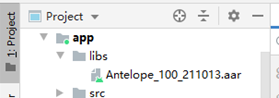
- 请先将厂商提供的lib库加项目依赖路径,如下图:
Antelope_100*.aar
- Build.gradle中加增加如下配置:
dependencies {

    implementation fileTree\(include: \['\*.jar','\*.aar'\], dir: 'libs'\)

    implementation group: 'commons-codec', name: 'commons-codec', version: '1.11'

    implementation group: 'org.apache.commons', name: 'commons-lang3', version: '3.9'

    implementation group: 'com.alibaba', name: 'fastjson', version: '1.1.72.android'
}
- AndroidManifest.xml配置权限
<uses-permission android:name="android.permission.CAMERA"/>

<uses-permission android:name="android.permission.ACCESS\_WIFI\_STATE"/>

<uses-permission android:name="android.permission.INTERNET"/>

<uses-permission android:name="android.permission.WRITE\_EXTERNAL\_STORAGE"/>

<uses-permission android:name="android.permission.READ\_EXTERNAL\_STORAGE"/>

<uses-permission android:name="android.permission.ACCESS\_NETWORK\_STATE" />

<uses-permission android:name="android.permission.READ\_PHONE\_STATE"/>

<uses-permission android:name="android.permission.READ\_PRIVILEGED\_PHONE\_STATE" />
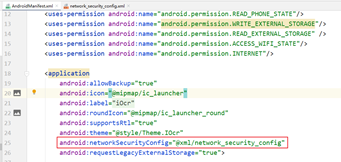
- 需要在AndroidManifest.xml中增加如下配置方可访问网络(如下图:)
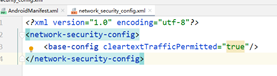
- network_security_config.xml中内容如下:
4、附录
4.1、错误代码说明
| Code | 说明 | 建议 |
|---|---|---|
| 0 | 成功 | |
| -1 | SN授权失败 | 联系销售或者技术支持进行授权,需要提供SN和IMEI信息。 |
| -2 | 模型加载失败 |